SurgeryWeb Support Centre
How to Remove a News Post
From the Dashboard, click Latest News to view your existing news posts.

Removing a News Post – Bin
Find the post you would like to remove. Hover over the post title and click Bin.

The post will be moved to the Bin and will no longer appear on your website.
If needed, you can also open the Bin section to restore a deleted post or delete it permanently.
Removing a News Post – Keeping it as a Draft
If you would like to keep a copy of the post for audit or record-keeping purposes, you can instead edit the post and change its status to Draft.
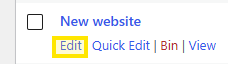
Find the post you would like to remove. Hover over the post title and click Edit.
On the right hand side under the Publish options, click on Edit next to Status: Published.
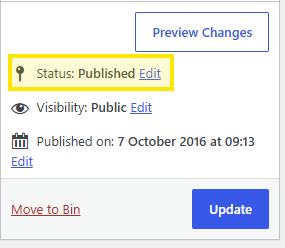
From drop down button select Draft, OK and Update.
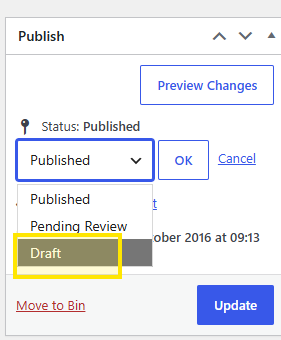
The post will remain available in the Dashboard but will no longer be published on the website.
Was this helpful? Give it a thumbs up!