SurgeryWeb Support Centre
Information Card
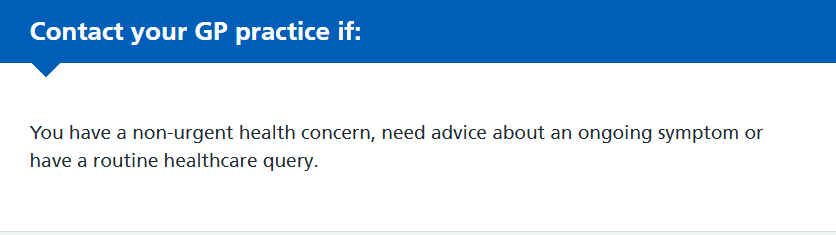
The Information Card allows you to highlight important healthcare advice in a coloured box, making it easier for visitors to find relevant information and understand what action they may need to take.
There are two card types, depending on the level of urgency:
- Blue – Non-urgent: For routine healthcare information and advice, such as when to contact your GP practice.
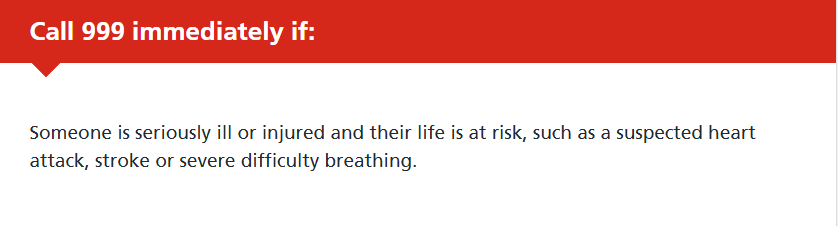
- Red – Urgent: For highlighting urgent or emergency information, such as when to call 999 for a life-threatening emergency.
How to add an Information Card
- Open the page you wish to edit.
- Place your cursor where you want the Information Card to appear.
- Click NHS Page Elements in the editor toolbar.
- Select Information Card.
- The Card Details window will open.
- From the Heading Type dropdown menu, select Blue – Non-urgent or Red – Urgent, depending on the information you want to display.
- Enter your chosen title in the Card Heading field, for example, for a non-urgent card – Contact your GP practice if:
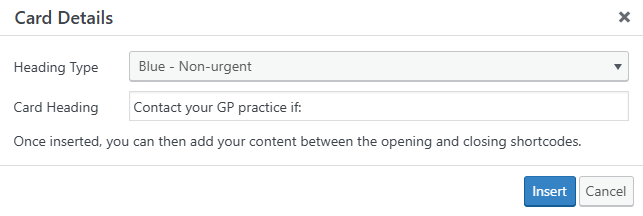
- Click Insert to add the Information Card to your page.
How to edit your Information Card
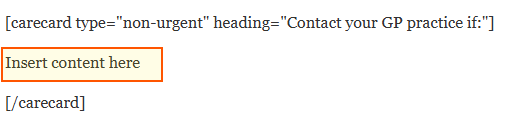
Once inserted, the Information Card will appear in the editor as a shortcode with an opening and closing tag.
You can customise the card by editing the following:
- type – Controls the card style. Use non-urgent for a blue card or urgent for a red card.
- heading – The title displayed at the top of the card, for example, Contact your GP practice if:
- Card content – Replace Insert content here with the information you want to display. You can include text, bullet points and links.

Important:
- Only change the information within the quotation marks when editing the card type or heading.
- Keep all your content between the opening [carecard] shortcode (including its settings) and the closing [/carecard] shortcode. Content placed outside these shortcodes will not appear inside the Information Card.
- Do not remove the shortcode brackets, quotation marks or field names, as these are required for the Information Card to work correctly.
- Click Update to save your changes.
Tip: Information Cards are particularly useful for highlighting healthcare advice, safety information and important instructions. Keep the content short and clear, and choose the appropriate card colour to help visitors recognise the level of urgency.
Was this helpful? Give it a thumbs up!