SurgeryWeb Support Centre
Action Link
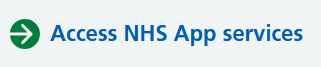
The Action Link allows you to add a prominent NHS-style link to your page, making it easier for visitors to access important services or information.
For example, an Action Link can be used to direct visitors to the NHS App, where they can access a range of NHS services online.
How to add an Action Link
-
- Open the page you wish to edit.
- Place your cursor where you want the Action Link to appear.
- Click NHS Page Elements in the editor toolbar.
- Select Action Link.
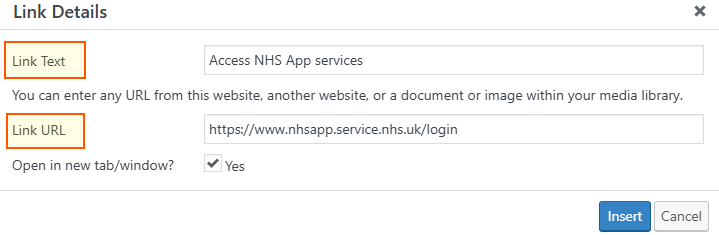
- The Link Details window will open.
How to complete the Link Details
- Link text – Enter the text you want visitors to see, for example, Access NHS App services.
- Link URL – Enter the full web address you want the link to open, for example, https://www.nhsapp.service.nhs.uk/login.
- Open in new tab/window? – Tick Yes if you want the link to open in a new browser tab. Leave it unticked to open the link in the same tab.
- Click Insert to add the Action Link to your page.
How to edit your Action Link
Once inserted, the Action Link will appear in the editor as a shortcode, as shown below:

You can edit the Action Link directly by changing the information within the quotation marks:

- label – The text visitors will see, for example, Access NHS App services.
- link – The web address visitors will be taken to when they click the Action Link.
- external – Controls how the link opens. Use yes to open the link in a new browser tab or no to open it in the same tab.
Important: Only change the information within the quotation marks. Do not remove the shortcode brackets, quotation marks or field names, as these are required for the Action Link to work correctly.
- Check that the link text and web address are correct.
- Click Update to save your changes.
Tip: Action Links are particularly useful for highlighting important actions, such as accessing online services, completing forms or making appointments. Keep the link text short and clear so visitors know what to expect when they click it.
Was this helpful? Give it a thumbs up!